Thursday, December 25, 2008


Friday, November 21, 2008
The New 13-inch MacBook ^^
From the stunning aluminum unibody to the powerful graphics architecture, the new MacBook makes progress a beautiful thing.

Square one: a solid block of aluminum.
Instead of assembling a notebook from many minor parts, the new MacBook was reinvented from just one: the new, solid-aluminum unibody enclosure. It gets full credit for making MacBook thinner, lighter, and even more stunning. But it’s not all beauty. Because of the unibody, this MacBook is also durable. It was designed to take on your world. So slip it into your backpack or briefcase and pull it out wherever you go — it’s impressive in any setting.
Even the keyboard is advanced.
The MacBook keyboard is solid, responsive, and comfortable. Just put your fingers on the crisp keys and you’ll feel pure typing bliss. An illuminated keyboard, a popular feature of MacBook Pro and MacBook Air, now comes standard on the 2.4GHz MacBook model. So when you’re in low-light settings such as airports or lecture halls, you can always see what you’re typing. It’s a luminous feature for anyone on the go.
Hey, where’s the button?
The amazing new trackpad doubles as a button — just press down anywhere and consider it clicked. No separate button means there’s 39 percent more room for your fingers to move on the silky glass surface. Now that Multi-Touch gestures have come to MacBook, all the function is in your fingers. Use two fingers to scroll up and down a page. Pinch to zoom in and out. Swipe with three fingers to flip through your photo libraries. Rotate to adjust an image with your fingertips. Using the new four-finger swipe gesture, swipe up or down to access Exposé modes and left or right to switch between open applications. If you’re coming from a right-click world, you can right-click with two fingers or configure a right-click area on the trackpad. The more you use the Multi-Touch trackpad, the more you’ll wonder what you ever did without it.
All-new Multi-Touch trackpad
Multi-Touch comes to MacBook in a spacious, silky-smooth trackpad that is also the button. Simply stunning.

The beautifully seamless, remarkably thin design isn’t the only gleaming quality of the LED-backlit display. Open your MacBook and you’re instantly greeted by glorious full screen brightness. The aluminum enclosure is perfectly integrated with a glass overlay that stretches to the edge of the notebook, providing a completely unobstructed picture. Anything you view, including the glossy widescreen display itself, is a spectacular experience. The LED-backlit display is more power efficient. And it’s mercury- and arsenic-free, so it’s greener than ever.Cooler creatures. Richer worlds. 
The NVIDIA GeForce 9400M brings up to five times faster, discrete-level graphics performance to MacBook.1 That means high-end, high-speed 3D game-playing power. Graphics-intensive features in iPhoto and iMovie are smooth and responsive. Movies and video offer rich colors and fine details. NVIDIA performance even makes a difference as you flip through your music library with Cover Flow or use the Dashboard.
Graphics Performance
The NVDIA GeForce 9400M delivers up to 5x faster graphics performance.
Take it all along. 
With a hard drive up to 320GB,2 you can load MacBook with movies, photos, and documents and take everything with you. You also have the option to upgrade to a 128GB solid-state drive, which has no moving parts, for enhanced durability. With the ultrafast 8x SuperDrive, burn everything you watch, listen to, or create onto DVDs and make room for even more.
Ports with possibilities. 
MacBook is iPod, iPhone, digital camera, and external hard drive ready. You’ll find two USB 2.0 ports to connect a wide variety of peripherals. You’ll also see a Mini DisplayPort — a perfect fit for the new Apple LED Cinema Display. The MagSafe power port gives you a trip-proof connection to safeguard your system and valuable data. And you can use the Kensington lock slot to protect your MacBook, battery, and hard drive.
Think fast. 
Inside the new MacBook is a powerful Intel Core 2 Duo processor running at speeds up to 2.4GHz. MacBook also boasts an increased 1066MHz frontside bus and next-generation 1066MHz DDR3 memory. That faster memory lets you quickly and easily manipulate large, complex files and keep more applications open at once.


Mobility mastered.

Wherever you go, wireless capabilities go with you. With the latest 802.11n wireless technology built into MacBook, you’re always connected to the wireless world out there, at home, and at work.3 It’s seamless and effortless to connect to a Wi-Fi network and surf the web, send email, video chat, and more. With up to 5 hours of wireless productivity battery life, consider yourself a free agent.4 At home, stream music wirelessly from your couch. Rent movies wirelessly with iTunes. And print documents or photos from anywhere. For an instantly ideal workspace, connect your MacBook to the new Apple LED Cinema Display. MacBook also includes Bluetooth capabilities, so brilliant accessories such as the optional Apple Wireless Keyboard and wireless Mighty Mouse free your desk from cables and cords.

You. In two places at once.
Cleverly integrated — almost hidden — at the top of the MacBook display is an iSight camera. Use it with iChat, and you can be anywhere without actually being there. Video chat with a buddy, share a photo slideshow with Mom, or run through a presentation with a colleague.5 Use iSight with Photo Booth for fun photo effects. And there’s no need to waste valuable primping time installing software or configuring the camera. Like everything Mac, iSight just works.
=========================
Technical Specifications
Size and weight
- Height:
- 0.95 inch (2.41 cm)
- Width:
- 12.78 inches (32.5 cm)
- Depth:
- 8.94 inches (22.7 cm)
- Weight:
- 4.5 pounds (2.04 kg)1

Connections and expansion

- MagSafe power port
- Gigabit Ethernet port
- Two USB 2.0 ports (up to 480 Mbps)
- Mini DisplayPort
- Audio line in
- Audio line out
- Kensington lock slot
Communications

- Built-in AirPort Extreme Wi-Fi wireless networking2 (based on IEEE 802.11n draft specification); IEEE 802.11a/b/g compatible
- Built-in Bluetooth 2.1 + EDR (Enhanced Data Rate)
- Built-in 10/100/1000BASE-T Gigabit Ethernet (RJ-45 connector)

Audio
- Built-in stereo speakers
- Built-in omnidirectional microphone
- Combined optical digital input/analog line in (minijack)
- Combined optical digital output/analog line out (minijack)
- Supports Apple Stereo Headset with microphone
Environmental Status Report
MacBook is designed with the following features to reduce its environmental impact:
- Highly recyclable aluminum and glass enclosure
- Mercury-free LED-backlit display
- Arsenic-free glass
- BFR-free internal components
- PVC-free internal cables
- Meets ENERGY STAR requirements
- EPEAT Gold rating
Display

- 13.3-inch (diagonal) LED-backlit glossy widescreen display with support for millions of colors
- Supported resolutions: 1280 by 800 (native), 1152 by 720, 1024 by 640, and 800 by 500 pixels at 16:10 aspect ratio; 1024 by 768, 800 by 600, and 640 by 480 pixels at 4:3 aspect ratio; 720 by 480 pixels at 3:2 aspect ratio
Graphics and video support

- NVIDIA GeForce 9400M graphics processor with 256MB of DDR3 SDRAM shared with main memory3
- Extended desktop and video mirroring: Simultaneously supports full native resolution on the built-in display and up to 2560 by 1600 pixels on an external display, both at millions of colors
- Built-in iSight camera
- Mini DisplayPort

Video output options
DVI output using Mini DisplayPort to DVI Adapter
VGA output using Mini DisplayPort to VGA Adapter
Dual-link DVI output using Mini DisplayPort to Dual-Link DVI Adapter
Input

- Multi-Touch trackpad for precise cursor control; supports two-finger scrolling, pinch, rotate, three-finger swipe, four-finger swipe, tap, double-tap, and drag capabilities
2.0GHz MacBook
- Built-in full-size keyboard with 78 (U.S.) or 79 (ISO) keys, including 12 function keys and 4 arrow keys (inverted “T” arrangement)
2.4GHz MacBook
- Built-in full-size illuminated keyboard with 78 (U.S.) or 79 (ISO) keys, including 12 function keys and 4 arrow keys (inverted “T” arrangement)
Processor and memory

- 2.0GHz or 2.4GHz Intel Core 2 Duo processor with 3MB on-chip shared L2 cache running 1:1 with processor speed
- 1066MHz frontside bus
- 2GB (two 1GB SO-DIMMs) of 1066MHz DDR3 SDRAM; two SO-DIMM slots support up to 4GB

Storage

2.0GHz MacBook
- 160GB 5400-rpm Serial ATA hard disk drive4
- Optional 250GB or 320GB 5400-rpm hard drive or 128GB solid-state drive4
2.4GHz MacBook
- 250GB 5400-rpm Serial ATA hard disk drive4
- Optional 320GB 5400-rpm hard drive or 128GB solid-state drive4
Optical drive
-
8x slot-loading SuperDrive (DVD±R DL/DVD±RW/CD-RW)
Maximum write: 8x DVD-R, DVD+R; 4x DVD-R DL (double layer), DVD+R DL (double layer), DVD-RW, DVD+RW; 24x CD-R; 10x CD-RW
Maximum read: 8x DVD-R, DVD+R, DVD-ROM; 6x DVD-ROM (double layer DVD-9), DVD-R DL (double layer), DVD+R DL (double layer), DVD-RW, and DVD+RW; 24x CD

Battery and power5

- 45-watt-hour lithium-polymer battery
- 60W MagSafe Power Adapter with cable management system
- MagSafe power port
Electrical and operating requirements
- Line voltage: 100V to 240V AC
- Frequency: 50Hz to 60Hz
- Operating temperature: 50° to 95° F
(10° to 35° C) - Storage temperature: -13° to 113° F
(-24° to 45° C) - Relative humidity: 0% to 90% noncondensing
- Maximum operating altitude: 10,000 feet
- Maximum storage altitude: 15,000 feet
- Maximum shipping altitude: 35,000 feet

What’s in the box
- MacBook
- Display cleaning cloth
- 60W MagSafe Power Adapter, AC wall plug, and power cord
- Lithium-polymer battery
- Install/restore DVDs
- Printed and electronic documentation

Installed software
- Mac OS X v10.5 Leopard (includes Time Machine, Quick Look, Spaces, Spotlight, Dashboard, Mail, iChat, Safari, Address Book, QuickTime, iCal, DVD Player, Photo Booth, Front Row, Xcode Developer Tools)
- iLife ’08 (includes iTunes, iPhoto, iMovie, iDVD, iWeb, GarageBand)
Configurations
| 2.0GHz MacBook (MB466LL/A) | 2.4GHz MacBook (MB467LL/A) | |
|---|---|---|
| Enclosure | Precision aluminum unibody | |
| Processor | 2.0GHz Intel Core 2 Duo | 2.4GHz Intel Core 2 Duo |
| L2 cache | 3MB shared | |
| System bus | 1066MHz | |
| Memory | 2GB (two 1GB SO-DIMMs) of 1066MHz DDR3 SDRAM (PC3-8500); supports up to 4GB | |
| Hard drive4 | 160GB Serial ATA; 5400 rpm | 250GB Serial ATA; 5400 rpm |
| Slot-loading optical drive | 8x SuperDrive (DVD±R DL/DVD±RW/CD-RW) | |
| Graphics | NVIDIA GeForce 9400M graphics processor with 256MB of DDR3 SDRAM shared with main memory3 | |
| Video | Built-in iSight camera; Mini DisplayPort output port with support for DVI, VGA, and dual-link DVI (requires adapters, sold separately) | |
| Display | 13.3-inch (diagonal) LED-backlit glossy widescreen display, 1280-by-800 resolution | |
| USB | Two USB 2.0 ports (up to 480 Mbps) | |
| Audio | Built-in stereo speakers, built-in omnidirectional microphone, combined optical digital input/analog line in, combined optical digital output/analog line out | |
| Networking | Built-in 10/100/1000BASE-T (Gigabit) Ethernet | |
| Wireless | Built-in AirPort Extreme Wi-Fi (based on IEEE 802.11n draft specification)2; built-in Bluetooth 2.1 + EDR (Enhanced Data Rate) module | |
| Hardware accessories | 60W MagSafe Power Adapter, AC wall plug, power cord, lithium-polymer battery | |
| Limited warranty and service | Your MacBook comes with 90 days of free telephone support and a one-year limited warranty. Purchase the AppleCare Protection Plan to extend your service and support to three years from your computer’s purchase date. Only the AppleCare Protection Plan provides you with direct telephone support from Apple technical experts and the assurance that repairs will be handled by Apple-authorized technicians using genuine Apple parts. For more information, visit Apple support or call 800-823-2775. | |
| Apple and the global environment | Learn more about Apple’s dedication to reducing the environmental impact of our products and processes. The Apple Product Environmental Specification details the environmental attributes of our products. | |
| Recycling | Apple takes a holistic view of materials management and waste minimization. Learn more about how to recycle your Mac. | |
Options

Time Capsule
Time Capsule is a full-featured AirPort Extreme base station with a built-in hard drive. Back up wirelessly and create a Wi-Fi network with one device.
- 500GB or 1TB server-grade hard drive
- Wi-Fi Certified for 802.11n draft 2.0
- USB port for connecting a USB printer or USB external hard drive
Configure to order
- 160GB (5400-rpm) hard drive
- 250GB (5400-rpm) hard drive
- 320GB (5400-rpm) hard drive
- 128GB solid-state drive
- Up to 4GB of 1066MHz DDR3 SDRAM
- Apple Remote (MA128G/B)
- Apple USB Modem (MA034Z/A)
- Apple Mini DisplayPort to DVI Adapter (MB570)
- Apple Mini DisplayPort to Dual-Link DVI Adapter (MB571)
- Apple Mini DisplayPort to VGA Adapter (MB572)
- MagSafe Airline Adapter (MB441Z/A)
- AppleCare Protection Plan (MB578LL/A)
- Aperture 2 (MB673Z/A)
- Final Cut Express (MB278Z/A)
- Logic Express (MA806LL/A)
- iWork ’08 (MB624/A)
Accessories
- Apple LED Cinema Display (MB382LL/A)
- AirPort Extreme Base Station (MB053LL/A)
- AirPort Express Base Station (MB321LL/A)
- Apple Wireless Keyboard (MB167LL/A)
- Apple wireless Mighty Mouse (MB111LL/A)
- Apple Keyboard (MB110LL/A)
- Apple wired Mighty Mouse (MB112LL/A)
- Rechargeable Battery for MacBook (MB771)
- Actual weight varies by configuration and manufacturing process.
- Wireless Internet access requires a base station or other wireless access point and Internet access; fees may apply. Some ISPs are not currently compatible with AirPort.
- Memory available to Mac OS X may vary depending on graphics needs. Minimum graphics memory usage is 256MB.
- 1GB=1 billion bytes; actual formatted capacity less.
- Testing conducted by Apple in October 2008 using preproduction 2.4GHz Intel Core 2 Duo–based MacBook Pro units with a Higher Graphics Performance setting. Battery life depends on configuration and use. See www.apple.com/batteries for more information. The wireless productivity test measures battery life by wirelessly browsing various websites and editing text in a word processing document with display brightness set to 50%.


How to Partition and Format Hard Drives in Windows
A hard disk partition defines the storage space on your hard drive. This process allows you to make smaller, yet more logical, hard disks. Formatting the hard drive defines the kind of file system you will need to access your hard drives and partitions.
Creating and formatting a partition in Windows
Before you can create a partition on your hard drive in Windows, you will need to install an unused hard disk or must have ample unpartitioned space availabe on your existing hard drive. You can also opt to delete an existing partition to create a new one. In this tutorial, I will partition and format the unused space from one of my hard drives. The steps here will also work with hard disks with partitions which have been previously deleted; as well as with brand new hard drives.
Follow the steps to open the Disk Management Administrative Tool to access hard disk tasks: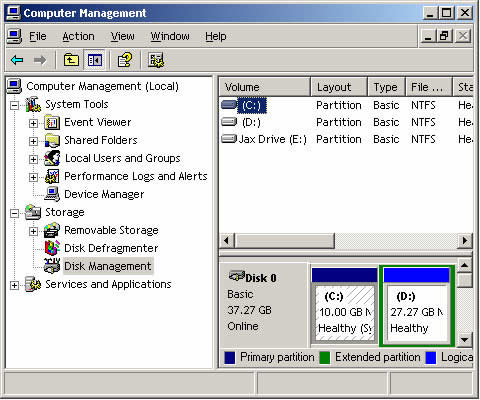
In the disk management tool, you will see a listing of all your hard drives and how they are partitioned. The image above shows that I have two hard disks installed. The first disk, or DISC 0, has two partitions. Drive letter C has 24 GB NTFS, while Drive letter E has 87 GB NTFS. These drive letters were assigned during a previous partition. In the second drive, there is only one partition, which is the D: partition. There is 26 GB of unallocated and therefore useable space that can be used to make other partitions.
From the unused space, you can make a partition by following the steps below.
Deleting a Partition in Windows
If you have an existing partition in your hard drive, and you wish to delete this for purposes only known to you, it is important for you to know that you will lose all the data in your partition.
Follow the steps below:
Creating and formatting a partition in Windows
Before you can create a partition on your hard drive in Windows, you will need to install an unused hard disk or must have ample unpartitioned space availabe on your existing hard drive. You can also opt to delete an existing partition to create a new one. In this tutorial, I will partition and format the unused space from one of my hard drives. The steps here will also work with hard disks with partitions which have been previously deleted; as well as with brand new hard drives.
Follow the steps to open the Disk Management Administrative Tool to access hard disk tasks:
- Click on the START button and select the CONTROL PANEL. If you do not have this shortcut on the START menu, open MY COMPUTER and click on the CONTROL PANEL.
- Double-click on the ADMINISTRATIVE TOOLS icon and open COMPUTER MANAGEMENT.
- If the CONTROL PANEL is in Category view, click on PERFORMANCE AND MAINTENANCE, then click on ADMINISTRATIVE TOOLS, and lastly double-click on the COMPUTER MANAGEMENT icon.
- Once the COMPUTER MANAGEMENT screen opens, just click on the DISK MANAGEMENT option; it is under the STORAGE category. A screen similar to the one below will appear.
In the disk management tool, you will see a listing of all your hard drives and how they are partitioned. The image above shows that I have two hard disks installed. The first disk, or DISC 0, has two partitions. Drive letter C has 24 GB NTFS, while Drive letter E has 87 GB NTFS. These drive letters were assigned during a previous partition. In the second drive, there is only one partition, which is the D: partition. There is 26 GB of unallocated and therefore useable space that can be used to make other partitions.
From the unused space, you can make a partition by following the steps below.
- Right click on the unallocated space.
- A new menu will come up, click on the NEW PARTITION option.
- A wizard on how you would like the partition to be created will open. On the first screen, press NEXT.
- On the second screen, you will be made to choose between a primary or extended partition. Detailed information about these kinds of partitions can be read at the tutorial listed above. Select Primary Partition, which is fine for most people, and press NEXT.
- The third screen will help you determine how much of the unallocated space you would like to use for the new partition. You can choose to use of all of space or you can stick with the default size. After you enter a size in the Partition size in MB: field, press NEXT.
- In the next screen, select a drive letter you want to assign your new partition, or you can also use the default letter given. The drive letter you chose will be how you access the partition later. Press NEXT when you are done.
- The next step will ask you how you would like the new partition to be formatted. The NTFS file system is advisable for most people. However, if you need a file system that is readable by older operating systems, such as DOS, Windows 95, Windows 98 or Windows ME, you should choose the FAT32 file system.
- You can type in a name for the Volume Label field, or you can leave it blank. This name will be associated with the new partition.
- After you press the NEXT button, a summary screen will appear. If you are satisfied with the partition you created, press FINISH to complete the creation and formatting of the new hard disk partition.
Deleting a Partition in Windows
If you have an existing partition in your hard drive, and you wish to delete this for purposes only known to you, it is important for you to know that you will lose all the data in your partition.
Follow the steps below:
- Click on the START button and select the CONTROL PANEL. If you do not have this shortcut on the START menu, open MY COMPUTER and click on the CONTROL PANEL.
- Double-click on the ADMINISTRATIVE TOOLS icon and open COMPUTER MANAGEMENT.
- If the CONTROL PANEL is in Category view, click on PERFORMANCE AND MAINTENANCE, then click on ADMINISTRATIVE TOOLS, and lastly double-click on the COMPUTER MANAGEMENT icon.
- Once the COMPUTER MANAGEMENT screen opens, just click on the DISK MANAGEMENT option; it is under the STORAGE category.
- Click on the partition you wish to delete and then choose the DELETE PARTITION option.
- A confirmation box will appear, and ask you if you are sure you wish to continue. Press YES if you are only sure that you want to delete the partition. Remember, if you press yes, all the data in the partition will be deleted.
- After you press YES, the partition will be deleted. You can choose to exit the program or create a new partition.
Wednesday, October 15, 2008
JAKJAZZ 2008 Artist Line up & Schedule

ARTISTS LINE UP :
INTERNATIONAL ARTISTS :
Yellowjackets feat Tohpati & Dewa Budjana, Peabo Bryson, Abraham Laboriel, Boi Akih, Mike del Ferro, Daniel Sahuleka (Netherlands), Michelle Nicole (Australia), Eye2Eye Jazz Mix (Malaysia), Djabe (Hungaria), Kyoto Jazz Massive (Japan), Lica Cecato (Brazil), Ray Harris & the Fusion Experience (UK), Roland Tchakounté (France), Smoma (Italia) dan Andrae Crouch .
INDONESIA ARTISTS :
Indra Lesmana, Gilang Ramadhan dan Pra Budi Dharma (Kayon), Dwiki Dharmawan Projects, SOL Projects, Zarro & the vega, Denny TR, Kiboud Maulana, Debu, Ahmad Dhani, (Dewa)Beben Quartet, Iga Mawarni, Devian feat Dina Mariana, Afghan, Andien, Story Tellers, Jopie Item, Jazzmint Big Band, Indro Hardjodikoro, Balawan Trio, Abdee Slank, Chlorophyl + DJ Set, Benny + Barry Likumahua, Sherly O etc
(For more details, please visit jakjazz.com & wartajazz.com)
Friday, September 19, 2008
Can't Smile Without You - Hellboy II (The Golden Army) 2008
You know I can't smile without you
I can't smile without you
I can't laugh and I can't sing
I'm finding it hard to do anything
You see I feel sad when you're sad
I feel glad when you're glad
If you only knew what I'm going through
I just can't smile without you
You came along just like a song
And brighten my day
Who would of believed that you where part of a dream
Now it all seems light years away
And now you know I can't smile without you
I can't smile without you
I can't laugh and I can't sing
I'm finding it hard to do anything
You see I feel sad when your sad
I feel glad when you're glad
If you only knew what I'm going through
I just can't smile
Now some people say happiness takes so very long to find
Well, I'm finding it hard leaving your love behind me
And you see I can't smile without you
I can't smile without you
I can't laugh and I can't sing
I'm finding it hard to do anything
You see I feel glad when you're glad
I feel sad when you're sad
If you only knew what I'm going through
I just can't smile without you
Wednesday, September 17, 2008
Tuesday, September 16, 2008
What's MRU list?
MRU stands for Most Recently Used. It is a list of your most recently visited web page, opened documents, etc. For instance, open Microsoft Word, click menu File. At the bottom of the menu you will see that there is a list of previous documents. That is MRU list. A lot of software create and use MRU list. So, actually MRU list is like your "history". It's not spyware, but some spywares use it to spy on you.
What are CBR, VBR, & ABR?
CBR = Constant Bitrate
VBR = Variable Bitrate
ABR = Average Bitrate
CBR ( Constant Bitrate ) means that the bitrat selected ( 128kbps, 192kbps, etc. ) is constant and does not deviate. CBR is useful for streaming multimedia content on limited capacity channels since it is the maximum bit rate that matters, not the average, so CBR would be used to take advantage of all of the capacity. CBR would not be the optimal choice for storage as it would not allocate enough data for complex sections ( resulting in degraded quality ) while wasting data on simple sections.
VBR ( Variable Bitrate ) varies the encoding used throughout the song depending on the requirement. For example, if the song is quiet or relatively simple, a lower bitrate might be used. VBR is preferred for storage ( as opposed to streaming ) because it creates a high quality output file with a reduced file size.
ABR ( Average Bitrate ) refers to the average amount of data transfered per second. An MP3 file that has an ABR of 128kbps transfers an average 128000 bits every second.
VBR = Variable Bitrate
ABR = Average Bitrate
CBR ( Constant Bitrate ) means that the bitrat selected ( 128kbps, 192kbps, etc. ) is constant and does not deviate. CBR is useful for streaming multimedia content on limited capacity channels since it is the maximum bit rate that matters, not the average, so CBR would be used to take advantage of all of the capacity. CBR would not be the optimal choice for storage as it would not allocate enough data for complex sections ( resulting in degraded quality ) while wasting data on simple sections.
VBR ( Variable Bitrate ) varies the encoding used throughout the song depending on the requirement. For example, if the song is quiet or relatively simple, a lower bitrate might be used. VBR is preferred for storage ( as opposed to streaming ) because it creates a high quality output file with a reduced file size.
ABR ( Average Bitrate ) refers to the average amount of data transfered per second. An MP3 file that has an ABR of 128kbps transfers an average 128000 bits every second.
Monday, September 15, 2008
HP Pavilion dv2800t Artist Edition series

Hot technology
The Pavilion dv2800t series Artist Edition features powerful Intel Centrino Duo processor technology. It also has Nvidia GeForce 8400M GS discrete graphics, which are ideal for games and entertainment.
Special artist edition
Our Pavilion dv2800t series notebook was designed by young people and chosen by young people as our artist edition. The design is displayed on the rear enclosure and palm rest; wallpaper mirrors the image so you can see it even when the notebook is closed.Cool video chatting
Stay in touch with friends and family using the optional Bluetooth and integrated low-light VGA webcam and two omni-directional microphones.Better view, better sound
The 14.1" (diagonal) high-definition BrightView widescreen lets you view 4 percent more on your screen than the 14" (diagonal) display, and the 16:10 aspect ratio easily positions two pages side by side.You'll get best-in-class video for games and multimedia with the Nvidia GeForce 8400M GS graphics card (128MB dedicated video memory). High-quality audio is supplied by integrated Altec-Lansing stereo speakers, and you can choose two sets of stereo earbud headphones so you and a friend can enjoy music without disturbing others. The integrated HDMI port (with discrete graphics option only) lets you view high-definition content on your HDTV (cable sold separately).
Ideal for music, photos, videos
The Pavilion dv2800t features the latest version of HP QuickPlay, which launches DVDs, music, and photos at the touch of a button. An included remote, which stores in the ExpressCard slot, gives you control from up to 10 feet away. Transfer photos from your digital camera to the dv2800t via the 5-in-1 digital media card reader, then use our Photosmart Premier software to help with photo editing, printing, organizing, sharing, and storing. You can turn pictures into movies, edit video, and create CDs and DVDs. Added bonus: burn your own, silkscreen-quality, laser-etched labels on discs when you can choose the LightScribe option on the SuperMulti DVD+/RW/R drive.Solid software
We test and qualify all software sold with our PCs to help ensure that you have a trouble-free experience with your new computer. Our software prices are also competitive: they're equal to--and often lower than--prices you'll commonly find in stores and online.Easy connections
Use the HP xb3000 Notebook Expansion Base (sold separately) to connect the dv2800t to your peripherals, including a monitor, for a true desktop experience. Other ports include two USB 2.0, an ExpressCard/54, an RJ-11, an RJ-45, an IEEE 1394 FireWire, an S-Video, and a consumer IR. You also get optional Intel Pro/Wireless 4965AGN WLAN with Bluetooth. Get connected in more places without having to hunt for hotspots, with the optional Verizon Wireless V740 1XEVDO PC ExpressCard1Designed with the environment in mind
HP notebook PCs are designed to be energy-efficient, with aggressive default power settings to help cut power consumption. HP complies with several voluntary government initiatives for energy efficiency, including ENERGY STAR®. In addition, our notebooks are designed to be recycled, and our packaging is designed to reduce environmental impact.Superior tech support
You get 30 days of free limited software support (or one year2 with product registration).
HP Official store
My Passport™ Elite™ Portable Hard Drives

My Passport™ Elite™
Portable Hard Drives
320 GB, USB 2.0
Beauty that's not just skin deep.
A luxurious soft-touch finish makes these drives easy to grip, comfortable to hold, and beautiful to show off to your friends. Combine that with mega-capacity that fits in your pocket, plus four powerful features -- capacity gauge, automatic backup, sync and encryption, and remote access software -- and you'll understand why we call these little drives Elite.
Pack up your office files and take them home. Carry thousands of songs or pictures. Back up your laptop. Synchronize files between home and office and encrypt everything on the drive for added security.
Key Features
| Soft-touch finish - A luxurious, soft-touch, finish makes these drives easy to grip, comfortable to hold, and beautiful to show off to your friends. Capacity Gauge - Connect My Passport to your computer and see at a glance how much space is available on your drive. Automatic backup - The same powerful backup software that we include in our desktop external hard drives is now available in this elegant little portable drive. Save a copy of your photos to an online sharing service, duplicate your e-mail and contacts to your iPod®, and back up all the precious files on your computer to your My Passport. Set it and forget it; every time you plug your My Passport into your computer your data is automatically backed up. Synchronized and secure - WD Sync™ synchronization and encryption software lets you take your critical data with you. Plug My Passport into any PC, edit files, read e-mail, and view photos. Then sync all of your changes back to your home or office computer. Your data is protected with 128-bit encryption. (Windows only) USB Powered - Powered directly from the USB port on your PC. No separate power supply is needed.* Remote access - Connect My Passport to any PC and run MioNet® Key software to remotely access files, music, and photos from any of your computers with MioNet software installed. Free for the life of the drive (Windows only) Easy - Installation is a snap because you don't really "install" this drive; you just plug it in and it's ready to use. There is no CD to install; the included software loads from the drive the first time you plug it in. Smart - Powered by the USB bus. No separate power supply is needed.* Big capacity that fits in your pocket - This compact drive fits easily in your pocket or purse, weighs only a few ounces, and with capacities up to 320 GB, you can take tons of photos, videos, files, and music with you wherever you go. Works with game consoles - Plug My Passport into the USB port on your gaming console to play your music or view photo and video files on your TV. Includes Google™ software - Search your drive, manage your photos, and simplify Web searches with included Google software. (Windows only) 5-year limited warranty Compatible - Use with Windows® and Mac computers * An optional cable is available for the few systems that limit power from the USB port. |
Ideal For
- Carrying important files and e-mail between work and home or on the road and keeping them in sync.
- Sharing large files between office and home, between PC and Mac®.
System Requirements
Windows
- Available USB port
- Windows 2000/XP/Vista
- Available USB port
- Mac OS X 10.4.10+, 10.5.2+
Compatibility may vary depending on user's hardware configuration and operating system.
Package Contents
- My Passport Portable hard drive
- USB 2.0 cable
- Quick Install Guide

 | Up to 91,000 digital photos |
 | Up to 80,000 songs (MP3) |
 | Up to 8,000 songs (uncompressed CD quality) |
 | Up to 24 hours of Digital Video (DV) |
 | Up to 100 hours of DVD quality video |
 | Up to 38 hours of HD video |
Beijing 2008 Olympics Theme Song - Beijing Welcomes You / 北京欢迎你 / 北京歡迎你 / bĕi jīng huān yíng nǐ
Composed by Xiao Ke (小柯) & Lyrics by Albert Leung (林夕)
Here is the song’s lyrics in original and the translated version as well as names and lines for every singer:
1. 陈天佳 Chen Tianjia (that’s the girl who sang at the closing ceremony in Athens, remember?)
迎接另一个晨曦 带来全新空气
Greet the first sun rays in the morning and the fresh air that comes with it.
2. 刘欢 Liu Huan (he will perform later today the Olympics theme song at the opening ceremony together with Sarah Brightman)
气息改变情味不变 茶香飘满情谊
The air changes, but the taste of friendship never changes, just like the fragrance of the tea.
3. 那英 Na Ying (is considered as one of the best female singers in Mainland China)
我家大门常打开 开放怀抱等你
The door to our home is always open, we wait for you with open arms
4. 孙燕姿 Stephanie Sun (famous Singaporean female singer)
拥抱过就有了默契 你会爱上这里
Embracing one another is to know each other. You will fall in love with this place.
5. 孙悦 Sun Yue
不管远近都是客人 请不用客气
No matter how far you have come, everyone is a guest, please make yourself at home
6. 王力宏 Wang Lee-hom (American-born Chinese singer-songwriter known throughout all Asia)
相约好了再一起 我们欢迎你
We promised to be together again, we welcome you
7. 韩红 Han Hong (she’s a Chinese singer of ethnic Tibetan origin, the one that at 100-day countdown ceremony appeared dressed in an ugly adidas top)
我家种着万年青 开放每段传奇
In our home we plant evergreens, every blossom tells a Chinese story
8. 周华健 Emil Chau (Wakin) (one of the best known Chinese singers originated from Hong Kong)
为传统的土壤播种 为你留下回忆
Scatter seeds in our ancient land and take away with you unforgettable memories
9. 梁咏琪 Gigi Leung (Gigi is one of my favorite Chinese singers, she’s also from Hong Kong and is an actress too)
陌生熟悉都是客人 请不用拘礼
Friends and strangers are all welcome guests, please enjoy your stay here
10. 羽泉 Yu Quan (the most successful pop duo on the Chinese mainland)
第几次来没关系 有太多话题
It makes no difference how many times you have visited, we have much to share
11. 成龙 Jackie Chan (there’s no need to introduce Jackie)
北京欢迎你 为你开天辟地
Beijing welcomes you, a brand new world has been created for you
12. 任贤齐 Richie Ren (a popular Taiwanese singer and actor)
流动中的魅力充满着朝气
The intoxicating spirit of sportsmanship fills the air
13. 蔡依林 Jolin (Jolin Tsai is one of the most successful and popular singers in the Mandarin music market)
北京欢迎你 在太阳下分享呼吸
Beijing welcomes you, let us breathe the same air under the sun
14. 孙楠 Sun Nan
在黄土地刷新成绩
Break new records across our land
15. 周笔畅 Zhou Bichang (also known as Bibi Chow, a young Chinese star)
我家大门常打开 开怀容纳天地
The door to our home is always open, we open our hearts to heaven and earth
16. 韦唯 Wei Wei (another popular Chinese female singer)
岁月绽放青春笑容 迎接这个日期
The years reflect the joys of youth as we welcome this day
17. 黄晓明 Huang Xiao Ming (Chinese actor)
天大地大都是朋友 请不用客气
We are all friends in this giant world, please make yourself at home
18. 韩庚 Hankyung (known in Korea as 한경, the first foreign artist to break into the Korean music industry)
画意诗情带笑意 只为等待你
Everything is prepared, just waiting for you.
19. 汪峰 Wang Feng
北京欢迎你 像音乐感动你
Beijing welcomes you, we hope the melody touches your heart
20. 莫文蔚 Karen Mok (popular female singer from Hong Kong)
让我们都加油去超越自己
Come on! Let’s exceed our limits.
21. 谭晶 Tan Jing
北京欢迎你 有梦想谁都了不起
Beijing welcomes you, if you dream you can achieve greatness.
22. 陈奕迅 Eason Chan (another popular Hong Kong artist)
有勇气就会有奇迹
Where there is courage there can be miracles.
23. 阎维文 Yan Weiwen
北京欢迎你 为你开天辟地
Beijing welcomes you, a brand new world has been created for you
24. 戴玉强 Dai Yuqiang (tenor and one of the leading actors of the Opera House)
流动中的魅力充满着朝气
The intoxicating spirit of sportsmanship fills the air
25. 王霞 李双松 Wang Xia & Li Shuangsong (the band)
北京欢迎你 在太阳下分享呼吸
Beijing welcomes you, let us breathe the same air under the sun
26. 廖昌永 Liao Chan Yong (is one of the best Chinese Singers on the world opera stage today)
在黄土地刷新成绩
Break new records across our land
27. 林依轮 Allen Lin
北京欢迎你 像音乐感动你
Beijing welcomes you, we hope the melody touches your heart
28. 장나라 Jang Nara (Popular Korean singer & actress)
让我们都加油去超越自己
Come on! Let’s exceed our limits.
29. 林俊杰 JJ Lam (Singapore singer )
北京欢迎你 有梦想谁都了不起
Beijing welcomes you, if you dream you can achieve greatness.
30. 阿杜 A-Do (also known as Do Cheng Yi friend with the previous guy, also from Singapore)
有勇气就会有奇迹
Where there is courage there can be miracles.
31. 京剧 Beijing Opera Singers
北京欢迎你呀…
Beijing welcomes you…
32. 容祖儿 Joey (Joey Yung is a popular singer and actress from Hong Kong)
我家大门常打开 开放怀抱等你
The door to our home is always open, we open our hearts to heaven and earth
33. 李宇春 Li Yuchun / Chris Lee (another fresh Chinese star)
拥抱过就有了默契 你会爱上这里
Embracing one another is to know each other. You will fall in love with this place.
34. 黄大炜 David Huang
不管远近都是客人 请不用客气
No matter how far you have come, everyone is a guest, please make yourself at home
35. 陈坤 Chen Kun
相约好了再一起 我们欢迎你
We promised to be together again, we welcome you
36. 谢霆锋 Nicholas Tse (well-known Hong Kong based singer and actor)
北京欢迎你 为你开天辟地
Beijing welcomes you, a brand new world has been created for you
37. 韩磊 Han Lei (just her voice, she’s not shown)
流动中的魅力充满着朝气
The intoxicating spirit of sportsmanship fills the air
38. 徐若瑄 Vivian (Vivian Hsu is Taiwanese renowned singer, actress, and model)
北京欢迎你 在太阳下分享呼吸
Beijing welcomes you, let us breathe the same air under the sun
39. 费翔 Kris Phillips (just voice, he is a Taiwanese-American pop idol and musical singer)
在黄土地刷新成绩
Break new records across our land
40. 汤灿 Tangchan
我家大门常打开 开怀容纳天地
The door to our home is always open, we open our hearts to heaven and earth
41. 林志玲 张梓琳 Eileen Chiling (Chiling is the Miss World 2007 title holder)
岁月绽放青春笑容 迎接这个日期
The years reflect the joys of youth as we welcome this day
42. 张靓颖 Jane Zhang (the woman with the dolphin voice)
天大地大都是朋友 请不用客气
We are all friends in this giant world, please make yourself at home
43. 许茹芸 伍思凯 Valen Hsu & Sky (Taiwanese)
画意诗情带笑意 只为等待你
Everything is prepared, just waiting for you.
44. 杨坤 范玮琪 Yang Kun & Fan Fan
北京欢迎你 像音乐感动你
Beijing welcomes you, we hope the melody touches your heart
45. 游鸿明 周晓欧 Chris Yu & Zhou Xiao Ou
让我们都加油去超越自己
Come on! Let’s exceed our limits.
46. 沙宝亮 满文军 Sha Baoliang & Man Wen Jun
北京欢迎你 有梦想谁都了不起
Beijing welcomes you, if you dream you can achieve greatness.
47. 金海心 何润东 Hannah & Peter Ho (but Hannah is not shown, Peter is American-born Chinese actor)
有勇气就会有奇迹
Where there is courage there can be miracles.
48. 飞儿 庞龙 Pang Long from F.I.R. (popular Taiwanese trio band)
北京欢迎你 为你开天辟地
Beijing welcomes you, a brand new world has been created for you
49. 吴克群 齐峰 Wu Kequn & Qi Feng
流动中的魅力充满着朝气
The intoxicating spirit of sportsmanship fills the air
50. 5566 胡彦斌 Anson Hu (5566 is a famous Taiwanese boy band)
北京欢迎你 在太阳下分享呼吸
Beijing welcomes you, let us breathe the same air under the sun
51. 郑希怡 刀郎 Yumiko Cheng, Dao Lang (chinese voice with a Japanese name)
在黄土地刷新成绩
Break new records across our land
52. 纪敏佳 屠洪刚 吴彤 Ji Minjia, Tu Honggang & Wu Tong
北京欢迎你 像音乐感动你
Beijing welcomes you, we hope the melody touches your heart
53. 郭容 刘耕宏 腾格尔 Guo Rong, Liu Geng Hong & Teng Ge Er
让我们都加油去超越自己
Come on! Let’s exceed our limits.
54. 金莎 苏醒 韦嘉 Kitty Land Kym, Allen Su & Wei Jia
北京欢迎你 有梦想谁都了不起
Beijing welcomes you, if you dream you can achieve greatness.
55. 付丽珊 黄征 房祖名 Fu Lishan, Shawn, Jaycee Chan (Jaycee is Jackie Chan’s son)
有勇气就会有奇迹
Where there is courage there can be miracles.
56. Various artists singing together
北京欢迎你 有梦想谁都了不起
Beijing welcomes you, if you dream you can achieve greatness.
有勇气就会有奇迹
Where there is courage there can be miracles.
北京欢迎你 有梦想谁都了不起
Beijing welcomes you, if you dream you can achieve greatness.
有勇气就会有奇迹
Where there is courage there can be miracles.
Monday, May 26, 2008
Indiana Jones and the Kingdom of the Crystal Skull
After long hibernation for 19 years, finally Indiana Jones is back with his new adventure on 22nd May, 2008 in theaters worldwide. This time, he's hunting for a mystical crystal skull in the Amazonian jungle -- and reuniting with a lost love. This 3rd sequel is packed with excitement, romance, humor and amazing special effects. Not too shabby for Indy's first adventure in nearly two decades!
This 4th Indiana installment surely let me down; it didn't really live up to my expectations. After 19 years, it seemed to lost a significant portion of its magic charm.
Despite all the weak slapstick and deflated tension, and some of the sequences which is too goofy to work as action scene and not funny enough to be comedy, Indy IV is still a fun movie to spend your relaxing time. What made me disappointed is that most of the ideas here are not so sparkling as it supposed (is expected) to be, can-easily-be-guessed surprises, and the ENDING! what a lame scene... I was hoping for something better from Spielberg and producer George Lucas...
It might not be as good as we expected but it's still a worthy successor to those earlier three films in the series. I peg Kingdom of the Crystal Skull below all of its predecessors. But however, Indy still rocks! It's worthy enough to sit and spend 2 hours and 15 minutes for a fun & adventurous summer movie like this.
I scored "Indiana Jones and the Kingdom of the Crystal Skull" a whip cracking 8/10.
This 4th Indiana installment surely let me down; it didn't really live up to my expectations. After 19 years, it seemed to lost a significant portion of its magic charm.
Despite all the weak slapstick and deflated tension, and some of the sequences which is too goofy to work as action scene and not funny enough to be comedy, Indy IV is still a fun movie to spend your relaxing time. What made me disappointed is that most of the ideas here are not so sparkling as it supposed (is expected) to be, can-easily-be-guessed surprises, and the ENDING! what a lame scene... I was hoping for something better from Spielberg and producer George Lucas...
It might not be as good as we expected but it's still a worthy successor to those earlier three films in the series. I peg Kingdom of the Crystal Skull below all of its predecessors. But however, Indy still rocks! It's worthy enough to sit and spend 2 hours and 15 minutes for a fun & adventurous summer movie like this.
I scored "Indiana Jones and the Kingdom of the Crystal Skull" a whip cracking 8/10.
Friday, May 23, 2008
The Chronicles of Narnia: Prince Caspian (2008)
What's the story?
The characters of C.S. Lewis's timeless fantasy come to life once again in this newest installment of the "Chronicles of Narnia" series, in which the Pevensie siblings are magically transported back from England to the world of Narnia, where a thrilling, perilous new adventure and an even greater test of their faith and courage awaits them. One year after the incredible events of "The Lion, the Witch and the Wardrobe," the Kings and Queens of Narnia find themselves back in that faraway wondrous realm, only to discover that more than 1300 years have passed in Narnian time. During their absence, the Golden Age of Narnia has become extinct, Narnia has been conquered by the Telmarines and is now under the control of the evil King Miraz, who rules the land without mercy. The four children will soon meet an intriguing new character: Narnia's rightful heir to the throne, the young Prince Caspian, who has been forced into hiding as his uncle Miraz plots to kill him in order to place his own newborn son on the throne. With the help of the kindly dwarf, a courageous talking mouse named Reepicheep, a badger named Trufflehunter and a Black Dwarf, Nikabrik, the Narnians, led by the mighty knights Peter and Caspian, embark on a remarkable journey to find Aslan, rescue Narnia from Miraz's tyrannical hold, and restore magic and glory to the land. Directed once again by veteran director Andrew Adamson, screenplay by Andrew Adamson and Christopher Markus & Stephen McFeely and produced by Mark Johnson, Andrew Adamson and Philip Steuer, the film reunites the original cast and creative team behind the blockbuster first film in the series.
--© Walt Disney Pictures/Walden Media
My review...
This second installment of fantasy epic movie invites us into its rich realm. With better meshing of the real and the computer-generated, The Chronicles of Narnia: Prince Caspian holds us at two-plus hours. Like finest fantasy epic movies, Prince Caspian entertains our eyes with enchanting scenery, energetic battle sequences, and several surprises which add new tension to the movie, like startling sequence in which old agents of the White Witch attempt to channel – and resurrect – her spirit via the sacrifice of blood from a son of Adam. Unfortunately, it's no better than its predecessor. Don't expect mythical grandeur or more grown-up story line here, the four child actors just couldn't hold up the film even with the help of handsome but dull Prince Caspian (Ben Barnes). It's obvious that the weak screenplay made this movie kind of "lost in the wonderland"; it sure tried to expose the wondrous world of magic and fantasy, the characters inside are just incapable to deliver a viable ingredient of this movie. Allow me to say that this second adaption of CS Lewis popular series has lost its human touch.
Anyway, despite its preposterous story, Prince Caspian can still be an enjoyable movie, if you just shut your logic. It also got a soaring music!
The first installment was quite a so so movie for me, and this one is pretty much the same for me. Prince Caspian is no league to the mighty trilogy "Lord of the Rings".
I rate The Chronicles of Narnia: Prince Caspian an embattled 5 out of 10.
The characters of C.S. Lewis's timeless fantasy come to life once again in this newest installment of the "Chronicles of Narnia" series, in which the Pevensie siblings are magically transported back from England to the world of Narnia, where a thrilling, perilous new adventure and an even greater test of their faith and courage awaits them. One year after the incredible events of "The Lion, the Witch and the Wardrobe," the Kings and Queens of Narnia find themselves back in that faraway wondrous realm, only to discover that more than 1300 years have passed in Narnian time. During their absence, the Golden Age of Narnia has become extinct, Narnia has been conquered by the Telmarines and is now under the control of the evil King Miraz, who rules the land without mercy. The four children will soon meet an intriguing new character: Narnia's rightful heir to the throne, the young Prince Caspian, who has been forced into hiding as his uncle Miraz plots to kill him in order to place his own newborn son on the throne. With the help of the kindly dwarf, a courageous talking mouse named Reepicheep, a badger named Trufflehunter and a Black Dwarf, Nikabrik, the Narnians, led by the mighty knights Peter and Caspian, embark on a remarkable journey to find Aslan, rescue Narnia from Miraz's tyrannical hold, and restore magic and glory to the land. Directed once again by veteran director Andrew Adamson, screenplay by Andrew Adamson and Christopher Markus & Stephen McFeely and produced by Mark Johnson, Andrew Adamson and Philip Steuer, the film reunites the original cast and creative team behind the blockbuster first film in the series.
--© Walt Disney Pictures/Walden Media
My review...
This second installment of fantasy epic movie invites us into its rich realm. With better meshing of the real and the computer-generated, The Chronicles of Narnia: Prince Caspian holds us at two-plus hours. Like finest fantasy epic movies, Prince Caspian entertains our eyes with enchanting scenery, energetic battle sequences, and several surprises which add new tension to the movie, like startling sequence in which old agents of the White Witch attempt to channel – and resurrect – her spirit via the sacrifice of blood from a son of Adam. Unfortunately, it's no better than its predecessor. Don't expect mythical grandeur or more grown-up story line here, the four child actors just couldn't hold up the film even with the help of handsome but dull Prince Caspian (Ben Barnes). It's obvious that the weak screenplay made this movie kind of "lost in the wonderland"; it sure tried to expose the wondrous world of magic and fantasy, the characters inside are just incapable to deliver a viable ingredient of this movie. Allow me to say that this second adaption of CS Lewis popular series has lost its human touch.
Anyway, despite its preposterous story, Prince Caspian can still be an enjoyable movie, if you just shut your logic. It also got a soaring music!
The first installment was quite a so so movie for me, and this one is pretty much the same for me. Prince Caspian is no league to the mighty trilogy "Lord of the Rings".
I rate The Chronicles of Narnia: Prince Caspian an embattled 5 out of 10.
Monday, May 19, 2008
» Bienvenue » Welkom » Welcome » Willkommen » Benvenuto » Recepción » Boa vinda »
Life is unpredictable, and it keeps changing every moment we breath...
We couldn't change our past - past is what brings us to present.
Present is one big challenge - how you value life, seize every opportunities, and bring out the best in ourselves.
Future can't be foreseen - faith and hope are things that keeps us striving.
Priceless memories might fade out as time goes by... consumed by everyday pressures & wearied by every obstacles we met.
I believe that by sharing our thoughts, ideas, opinions, as well as bits-and-pieces of our life will be a great way to expand our horizon and contribute to others' life.
Capturing experiences over time is a way to show the world who you really are and which direction are you going to in your journey of life... I think expressing yourself will eventually help you to discover who you really are, to maximize your potential and also develop yourself...
Nobody is perfect; we don't have to be perfect. We just have to make sure that we find our purpose in life and always give our best in every single moment we're living...
“Perfection is achieved, not when there is nothing more to add, but when there is nothing left to take away.”
- Antoine de Saint-Exupéry
“Perfection is not attainable, but if we chase perfection we can catch excellence.”
- Vince Lombardi
Carpe diem!
Bonjour!
We couldn't change our past - past is what brings us to present.
Present is one big challenge - how you value life, seize every opportunities, and bring out the best in ourselves.
Future can't be foreseen - faith and hope are things that keeps us striving.
Priceless memories might fade out as time goes by... consumed by everyday pressures & wearied by every obstacles we met.
I believe that by sharing our thoughts, ideas, opinions, as well as bits-and-pieces of our life will be a great way to expand our horizon and contribute to others' life.
Capturing experiences over time is a way to show the world who you really are and which direction are you going to in your journey of life... I think expressing yourself will eventually help you to discover who you really are, to maximize your potential and also develop yourself...
Nobody is perfect; we don't have to be perfect. We just have to make sure that we find our purpose in life and always give our best in every single moment we're living...
“Perfection is achieved, not when there is nothing more to add, but when there is nothing left to take away.”
- Antoine de Saint-Exupéry
“Perfection is not attainable, but if we chase perfection we can catch excellence.”
- Vince Lombardi
Carpe diem!
Bonjour!
Subscribe to:
Posts (Atom)